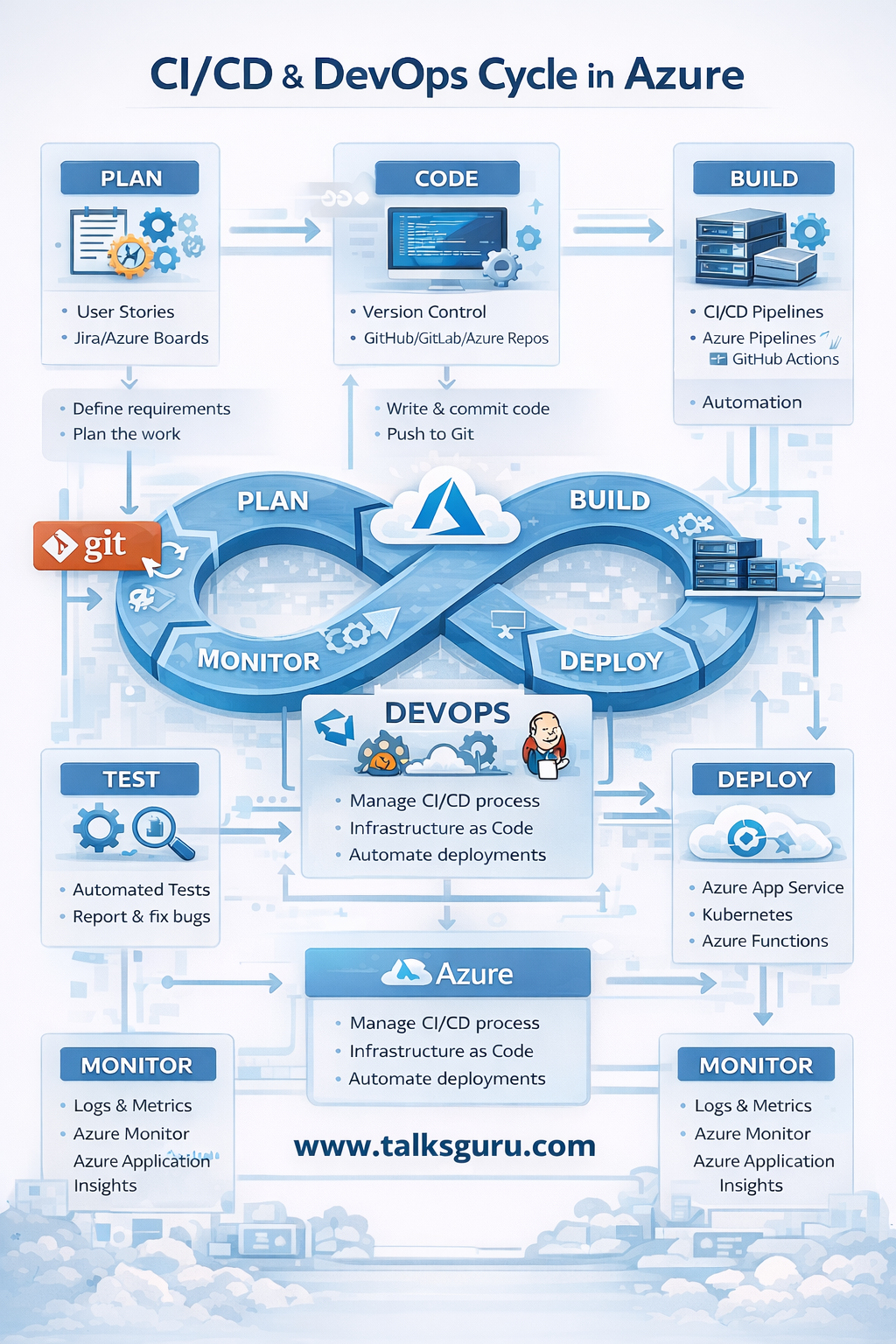
In today’s cloud-first world, DevOps and CI/CD are no longer optional they are foundational to delivering reliable, scalable, and secure applications. Over the years working on Azure-based projects, one thing has become clear: teams that master the DevOps cycle release faster, fail less, and recover quicker.
This article breaks down the CI/CD and DevOps cycle in Azure in a practical, easy-to-understand way, based on real implementation experience rather than theory.
What Is DevOps in Azure?
DevOps is a culture and set of practices that brings development and operations teams together. In Azure, DevOps is tightly integrated with tools that support automation, monitoring, security, and scalability.
Azure DevOps focuses on:
- Faster deployments
- Continuous feedback
- Reduced manual errors
- Improved system reliability
At the heart of this approach lies the CI/CD pipeline.
Understanding CI/CD in Azure
CI/CD stands for:
- Continuous Integration (CI) – Frequently merging code into a shared repository
- Continuous Deployment (CD) – Automatically deploying validated code to environments
In Azure, CI/CD pipelines help teams move from code commit to production with minimal manual intervention.
The Azure DevOps Lifecycle Explained
1. Plan
Everything starts with planning. Teams define requirements, user stories, and tasks using tools like Azure Boards or Jira.
Key activities:
- Define requirements
- Sprint planning
- Backlog grooming
Good planning reduces rework later in the pipeline.
2. Code (Version Control with Git)
Developers write code and push changes to a Git repository such as:
- Azure Repos
- GitHub
- GitLab
Best practices I’ve seen work:
- Feature branches
- Pull requests
- Mandatory code reviews
This keeps the codebase clean and production-ready.
3. Build (Continuous Integration)
Once code is pushed, the CI pipeline is triggered automatically.
Using Azure Pipelines or GitHub Actions, the system:
- Compiles code
- Resolves dependencies
- Creates build artifacts
- Runs initial checks
This step ensures broken code never moves forward silently.
4. Test
Automated testing is where quality is enforced.
Common test types:
- Unit tests
- Integration tests
- Security scans
- Code quality checks
From experience, teams that skip automated testing end up paying heavily during production incidents.
5. Deploy (Continuous Deployment)
Validated builds are deployed automatically to environments such as:
- Azure App Service
- Azure Kubernetes Service (AKS)
- Azure Functions
- Virtual Machines
Modern deployments use:
- Infrastructure as Code (ARM, Bicep, Terraform)
- Blue-Green or Canary deployments
- Rollback strategies
This minimizes downtime and deployment risk.
6. Monitor and Feedback
Deployment is not the end.
Using Azure Monitor, Log Analytics, and Application Insights, teams track:
- Performance
- Errors
- Availability
- User behavior
Monitoring closes the DevOps loop by feeding insights back into planning.
Why Azure DevOps Works So Well
From real-world delivery experience, Azure DevOps stands out because it:
- Integrates seamlessly with Azure services
- Supports hybrid and multi-cloud models
- Scales from startups to enterprises
- Encourages automation at every stage
Most importantly, it enforces discipline without slowing teams down.
Final Thoughts
DevOps success in Azure doesn’t come from tools alone it comes from consistent automation, shared responsibility, and continuous improvement. When CI/CD pipelines are designed properly, deployments stop being scary events and become routine operations.
If you’re starting or refining your DevOps journey in Azure, focus on:
- Automate early
- Test continuously
- Monitor everything
- Improve relentlessly
That’s how high-performing cloud teams are built.
